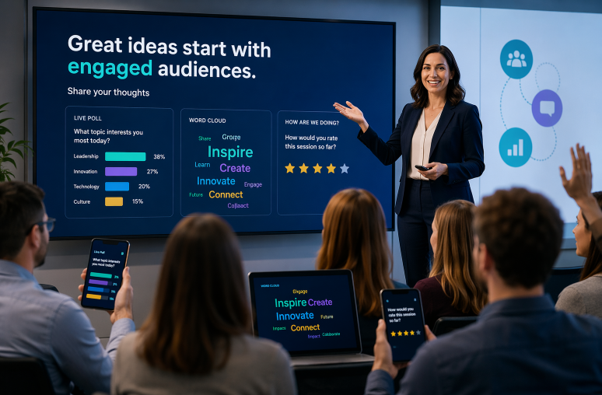
Attention is hard won and easily lost. Whether you are presenting in a boardroom, classroom, webinar or conference hall, most people expect more than a stream of bullet points and a speaker talking at them for half an hour. They want a reason to care, a clear message and, increasingly, a chance to take part. That is why interactive presentations have become one of the most effective ways to engage modern audiences.
An interactive presentation turns a one-way performance into a two-way experience. Instead of simply watching slides go by, the audience contributes through live polls, questions, quizzes, reflections, discussions or practical tasks. This matters because participation changes attention. When people do something with the content, they process it more deeply, remember more of it and feel more connected to the message.
That shift is especially important now. Guidance from presentation platforms and audience engagement providers in 2025 and 2026 points to the same challenge: people are distracted, multitasking and more likely to disengage when a session feels passive. [AhaSlides]() reports that 82.4% of surveyed presenters see regular audience distraction linked to multitasking, device use, screen fatigue and a lack of interactivity, while [Mentimeter]() highlights the growing use of live polls, quizzes and Q&A to encourage real-time participation.
If you want to improve audience engagement, increase retention and make your presentations more memorable, interactivity is no longer a bonus feature. It is part of effective communication. The strongest presenters understand that people are more likely to stay with a message when they feel involved in it.
What is an interactive presentation?
An interactive presentation is a presentation designed to involve the audience throughout the session rather than only at the end. That involvement can be digital, verbal or physical. You might ask participants to vote in a poll, post questions anonymously, discuss a scenario with a partner, choose between options on screen or complete a short task before moving to the next point.
The format can be used almost anywhere. Trainers use interactive presentations to improve learning. Sales teams use them to uncover objections and gain buy-in. Teachers use them to increase participation. Conference speakers use them to hold attention in large rooms. Leaders use them to turn briefings into conversations rather than announcements.
The real benefit is that interaction creates shared energy. Instead of the audience feeling like observers, they become contributors. That changes the atmosphere in the room and often improves the quality of discussion as well. People listen differently when they know they may be asked to think, respond or share an opinion.
Why modern audiences expect more
Audience expectations have changed. People are surrounded by responsive digital experiences every day. They click, swipe, react, comment and customise what they consume. Against that background, a traditional presentation can feel slow and distant, especially if it relies heavily on text-heavy slides and long explanations without variation.
This is even more obvious in virtual and hybrid settings. When somebody is joining from a laptop, there are dozens of distractions nearby. Email, chat messages, phone notifications and other open tabs all compete for attention. Without deliberate moments of involvement, it is easy for the presenter to lose the room without realising it.
Research on active learning and engagement supports the value of participation. A 2024 study highlighted by [Learning News]() found that active learning increased engagement significantly and improved knowledge retention by up to 54% compared with traditional lecture methods. Meanwhile, [AhaSlides]() notes that people often stop listening when sessions lack interaction and variety.
This does not mean every presentation must feel like a game show. It means presenters need to recognise that attention is not automatic. It has to be earned and renewed. Interaction is one of the most reliable ways to do that.
How interactive presentations improve audience engagement
The first advantage of interactivity is attention. A well-timed question or poll resets focus because it changes the rhythm of the session. Instead of listening passively, people have to think about their answer. That shift from receiving to responding can be enough to pull wandering minds back into the room.
The second advantage is retention. People tend to remember what they discuss, test or apply more than what they simply hear once. That is one reason interactive learning continues to gain attention across education and workplace training. [iSpring]() stresses that interactive presentation software helps maintain listener interest through quizzes, feedback and two-way communication, while [Learning News]() reports measurable gains in retention when learners are more actively involved.
The third advantage is insight. Interactive presentations give presenters immediate feedback. A live poll can reveal confusion, disagreement or hidden priorities within seconds. A question tool can uncover concerns that nobody wants to raise aloud. A brief discussion task can show whether people genuinely understand the point or are simply nodding along.
There is also an emotional benefit. Interaction creates connection. When people feel seen, heard and included, they are more likely to trust the presenter and value the session. In business settings, that can improve alignment. In training, it can increase confidence. In sales, it can open more honest conversations.
Practical ways to make a presentation interactive
One of the easiest ways to build interaction into a presentation is to start with a question. This works well because it creates immediate involvement and gives the audience a reason to think before the presenter begins delivering information. The question might be factual, reflective or opinion-based, depending on the topic.
Live polls remain one of the most popular options because they are quick, inclusive and easy to interpret. They work well in meetings, webinars and large events because even people who would never put up a hand can participate silently. [Mentimeter](), [Slides With Friends]() and [Venngage]() all emphasise the value of polls, word clouds, quizzes and Q&A as practical ways to keep audiences involved.
Quizzes are another strong option, particularly in training and educational settings. They help people test understanding without the pressure of a formal assessment. When used well, quizzes can raise energy levels and make a session feel more dynamic without becoming gimmicky.
Scenario-based discussion is especially powerful in business presentations. Instead of explaining an idea in abstract terms, present a realistic situation and ask the audience what they would do next. This turns the session into a problem-solving exercise and helps people connect theory with practice.
Question and answer can also be improved. Too many presenters leave all questions until the end, which often means the most interesting conversation happens when time is almost gone. Bringing questions into the middle of the presentation creates a stronger sense of dialogue and helps the speaker adjust to what the audience needs in the moment.
Low-tech interaction works brilliantly too. A show of hands, a short paired conversation, a brief written reflection or asking people to rank options can all create active involvement without any special software. Technology is useful, but it is not the only route to engagement.
Designing interactive presentations that work
Good interactivity starts with good design. If the presentation has no clear objective, the activities will feel random. Before adding polls or tasks, decide what the audience should understand, decide or do by the end. That objective should guide every interactive choice.
Structure matters as well. A useful rule of thumb is to include some form of interaction every five to ten minutes. This does not mean forcing an activity into every section. It means varying the pace often enough to stop the audience slipping into passive mode. [Presentation Experts]() recommends building in regular moments of participation because they help keep energy high and information memorable.
Slide design still matters. Interactive presentations need clean visuals, readable text and a strong sense of flow. Crowded slides make it harder for people to focus, especially when they are also being asked to respond. Simplicity supports participation. It should always be easy for the audience to understand what is happening and what they are meant to do next.
Storytelling also plays a vital role. Facts and figures are useful, but stories help people care. A short case study, a customer example or a familiar workplace scenario can provide the emotional hook that makes the interactive moments feel meaningful rather than mechanical.
Interactive presentations in virtual and hybrid settings
Online presentations need even more intentional interaction than face-to-face sessions. In a physical room, energy is easier to sense and attention is easier to recover. Online, silence can feel much longer and disengagement is harder to spot. That is why virtual presenters benefit from shorter sections, more regular prompts and clearer signposting.
Hybrid settings bring an extra challenge because there are effectively two audiences at once. If the presenter focuses only on the people in the room, remote participants can feel sidelined. Shared polls, moderated chat questions and activities that include both groups help reduce that divide.
The choice of tools matters here. According to [Mentimeter]() and [iSpring](), the best audience engagement tools are the ones that are easy to join, reliable and suitable for the context, whether that is training, webinars or hybrid meetings. If the technology is clumsy, the interaction will feel like a disruption rather than an enhancement.
Preparation is essential. Interactive features should always be tested before the session. Instructions need to be brief and clear. If a presenter appears unsure about the technology, confidence drops and momentum disappears quickly.
Common mistakes to avoid
The biggest mistake is adding interaction without purpose. If every poll, quiz or task feels random, the audience will see it as filler. Another problem is overloading the session with too many activities. Too much interaction can be as tiring as too little if it interrupts the flow constantly.
Ignoring audience input is another common error. If people vote or ask questions and the presenter carries on as though nothing happened, trust falls immediately. Participation needs a visible response. The audience should feel that their contribution influenced the session in some way.
It is also important not to confuse technology with engagement. Tools can help, but they are not the point. A weak presentation does not become effective simply because it includes a quiz. Strong interactive presentations still rely on clarity, relevance, confidence and useful content.
The future of engaging presentations
Interactive presentations are not a passing trend. They reflect a wider shift in how people prefer to learn, collaborate and make decisions. Modern audiences want more than information delivered at speed. They want relevance, participation and a sense that their attention matters.
For presenters, that is good news. Interactivity does not require expensive software or flashy techniques. It requires better choices: stronger questions, clearer structure, more deliberate pacing and a willingness to involve the audience as active participants rather than passive listeners.
If you want your next presentation to land more effectively, do not just ask what you want to say. Ask what you want the audience to do, think and feel while you are saying it. That is the real foundation of audience engagement. When people are drawn into the process, presentations become more memorable, more useful and far more persuasive.
Interactive presentations give modern audiences a reason to stay present. In a distracted world, that is one of the most valuable things any presenter can create.